---
title: How to Save a Quote as a Draft
description: 1. When you're logged in and browsing the site and find a product you're interested in, click on the image to go to the product detail page. 2. Choose the dimensions and click "Get a Quote". 3. You
---
[Skip to content](https://info.starkcarpet.com/migration/knowledge/how-to-place-an-order-and-pay-a-deposit#main-content)
English
Show submenu for translations
[Contact Us](https://info.starkcarpet.com/migration/knowledge/kb-tickets/new?hsLang=en)
![STARK Logo 200h.png\]](https://info.starkcarpet.com/hs-fs/hubfs/STARK%20Logo%20200h.png?height=40&name=STARK%20Logo%20200h.png)
Open main navigation
Close main navigation
- English
Show submenu for translations
- [Contact Us](https://info.starkcarpet.com/migration/knowledge/kb-tickets/new)
-
QUESTIONS?
- There are no suggestions because the search field is empty.
1. [Help Center](https://info.starkcarpet.com/migration/knowledge?hsLang=en)
2. [STARK WEBSITE FAQ](https://info.starkcarpet.com/migration/knowledge/stark-website-faq?hsLang=en)
# How to Save a Quote as a Draft
1\. When you're logged in and browsing the site and find a product you're interested in, click on the image to go to the product detail page.
.png?width=600&name=Screenshot%20(34).png)
2\. Choose the dimensions and click "Get a Quote".
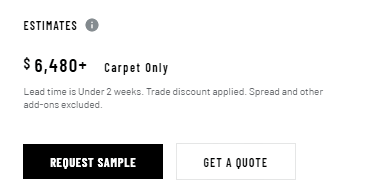
3\. You can choose a rug pad or elect to discuss options with your Account Manager here.
.png?width=616&name=Screenshot%20(57).png)
4\. Afterward, you can add the Pristine Treatment to your rug if you'd like.
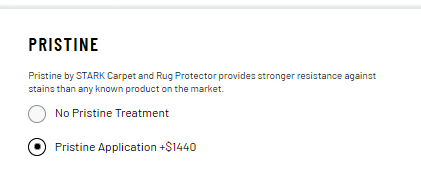
4\. After you have made your selection, you can enter your address.
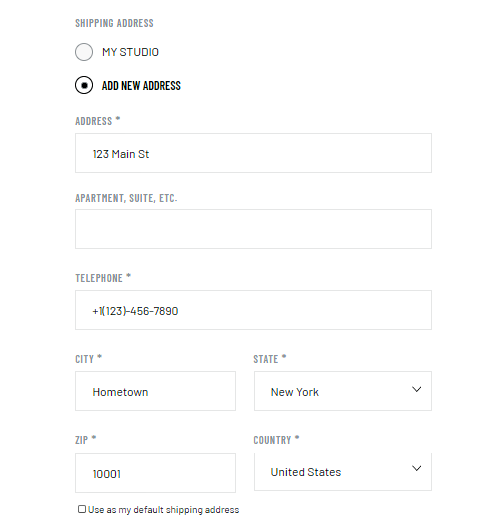
5\. You can choose your delivery type after you input your address.
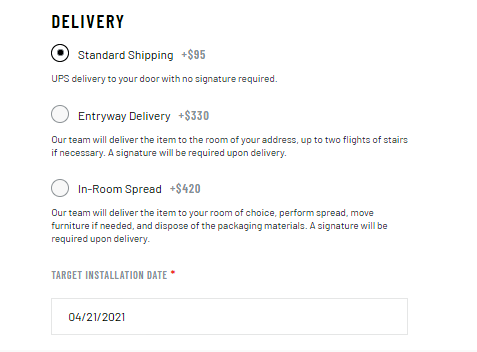
6\. To save your quote request as a draft, click on the "Save" icon in the top right-hand corner of the page.
.png?width=214&name=Screenshot%20(37).png)
7\. After you click the "Save" icon, you will receive a pop-up to confirm that your quote has been saved.
.png?width=437&name=Screenshot%20(36).png)
8\. You can access your quotes by clicking "My Account" and "Account Details".
.png?width=236&name=Screenshot%20(55).png)
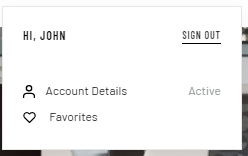
9\. From here, you can access your quotes by clicking on "Quotes & Orders", and then clicking on "My Quotes".
.png?width=295&name=Screenshot%20(53).png)
9\. You can view, edit, and delete quotes here.
.png?width=600&name=Screenshot%20(54).png)
- [CONTACT US](https://info.starkcarpet.com/migration/knowledge/contact-us?hsLang=en)
- [STARK WEBSITE FAQ](https://info.starkcarpet.com/migration/knowledge/stark-website-faq?hsLang=en)
- [CARE AND MAINTENANCE](https://info.starkcarpet.com/migration/knowledge/care-and-maintenance?hsLang=en)
- [SHIPPING AND RETURNS](https://info.starkcarpet.com/migration/knowledge/shipping-and-returns?hsLang=en)
- [SERVICES](https://info.starkcarpet.com/migration/knowledge/services?hsLang=en)
- [CARPET AND RUG PAD](https://info.starkcarpet.com/migration/knowledge/carpet-and-rug-pad?hsLang=en)
- [TERMS AND CONDITIONS](https://info.starkcarpet.com/migration/knowledge/terms-and-conditions?hsLang=en)
- [PRIVACY POLICY](https://info.starkcarpet.com/migration/knowledge/privacy-policy?hsLang=en)
[](https://ww.starkcarpet.com)
© 2015 - 2021 STARK CARPET CORPORATION
Copyright © 2026, STARK