---
title: How to Favorite Items
description: Please see the video and walkthrough tutorial below. 1. When you’re logged in and browsing the site and come across a product you’re interested in, select the heart icon in the upper right hand corne
---
[Skip to content](https://info.starkcarpet.com/migration/knowledge/how-to-favorite-items#main-content)
English
Show submenu for translations
[Contact Us](https://info.starkcarpet.com/migration/knowledge/kb-tickets/new?hsLang=en)
![STARK Logo 200h.png\]](https://info.starkcarpet.com/hs-fs/hubfs/STARK%20Logo%20200h.png?height=40&name=STARK%20Logo%20200h.png)
Open main navigation
Close main navigation
- English
Show submenu for translations
- [Contact Us](https://info.starkcarpet.com/migration/knowledge/kb-tickets/new)
-
QUESTIONS?
- There are no suggestions because the search field is empty.
1. [Help Center](https://info.starkcarpet.com/migration/knowledge?hsLang=en)
2. [STARK WEBSITE FAQ](https://info.starkcarpet.com/migration/knowledge/stark-website-faq?hsLang=en)
# How to Favorite Items
Please see the video and walkthrough tutorial below.
1\. When you’re logged in and browsing the site and come across a product you’re interested in, select the heart icon in the upper right hand corner of the product image to favorite it.
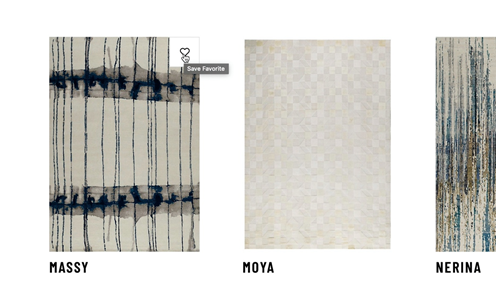
2\. Click the heart icon on any product you’d like to save for later reference.
3\. From here, select a folder to save the product in. You can save it in your My Favorites folder, or you can make a new folder if you’d like to organize things further.
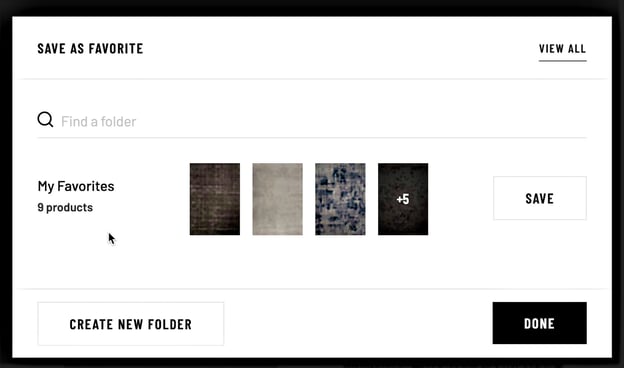
4\. Type the name of your new folder and click ‘Create.’ Then, next to folder you wish to save this product in, click ‘Save’ and then ‘Done.’
.jpg?width=631&name=4.%20Making%20a%20New%20Folder%20(2).jpg)
5\. You can also favorite an item on a product detail page. To favorite a product, click the heart icon in the upper right corner of the product page.
-1.png?width=553&name=Screenshot%20(7)-1.png).png?width=558&name=Screenshot%20(9).png)
6\. To access your favorites, click the dropdown arrow next to “My Account” and select “Favorites”.
.jpg?width=560&name=6.%20Finding%20Favorites%20(2).jpg)
7\. From here, all your folders of saved products are accessible here.
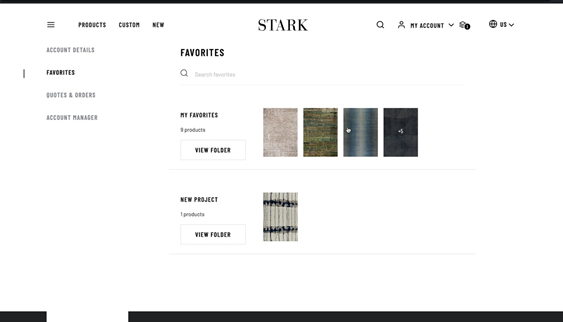
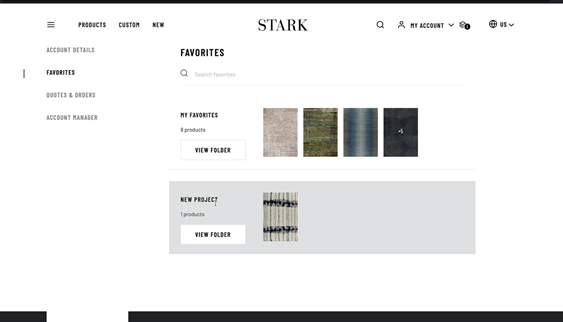
8\. Click ‘View Folder ’to organize a specific folder. Select a product to view its Product Detail Page, where you can order a sample, request a quote, or access more info on the product.
- [CONTACT US](https://info.starkcarpet.com/migration/knowledge/contact-us?hsLang=en)
- [STARK WEBSITE FAQ](https://info.starkcarpet.com/migration/knowledge/stark-website-faq?hsLang=en)
- [CARE AND MAINTENANCE](https://info.starkcarpet.com/migration/knowledge/care-and-maintenance?hsLang=en)
- [SHIPPING AND RETURNS](https://info.starkcarpet.com/migration/knowledge/shipping-and-returns?hsLang=en)
- [SERVICES](https://info.starkcarpet.com/migration/knowledge/services?hsLang=en)
- [CARPET AND RUG PAD](https://info.starkcarpet.com/migration/knowledge/carpet-and-rug-pad?hsLang=en)
- [TERMS AND CONDITIONS](https://info.starkcarpet.com/migration/knowledge/terms-and-conditions?hsLang=en)
- [PRIVACY POLICY](https://info.starkcarpet.com/migration/knowledge/privacy-policy?hsLang=en)
[](https://ww.starkcarpet.com)
© 2015 - 2021 STARK CARPET CORPORATION
Copyright © 2026, STARK
```json
{
"@context" : "https://schema.org",
"@type" : "VideoObject",
"contentUrl" : "https://6012047.fs1.hubspotusercontent-na1.net/hubfs/6012047/How%20To%20Favorite%20v4.mp4",
"dateModified" : "2022-06-01T03:16:43.556Z",
"description" : "",
"duration" : "PT1M1S",
"height" : 2050,
"name" : "How To Favorite v4",
"thumbnailUrl" : "https://6012047.fs1.hubspotusercontent-na1.net/hubfs/6012047/How%20To%20Favorite%20v4.mp4/medium.jpg",
"uploadDate" : "2021-03-23T13:08:21.314Z",
"width" : 3584
}
```